
Hi, I’m Roswell. If your washer is stuck, won’t spin, or has flashing lights, you are probably wondering how to reset kenmore washing machine without calling a costly repair technician. It is easier than you think. A simple factory reset often clears up most software glitches in minutes.
As an appliance expert, I have seen homeowners panic over a locked lid or a stalled cycle. Usually, the control board just needs a quick reboot. I will walk you through the exact methods to get your laundry routine back on track today.
Table of Contents
When and Why You Need to Reset Your Kenmore Washer
Before we dive into the steps, it helps to know when a reset is actually the right move. Washers are essentially big computers. Sometimes, their internal software gets confused.
You should try a Kenmore washer reset if you experience any of the following common issues:
- The washer stops mid-cycle and refuses to drain.
- The lid remains locked after the wash is completely finished, or you are staring at a kenmore washer lid locked light blinking
endlessly. (If this light is flashing, a simple reset might not be enough—check out our dedicated troubleshooting guide). - Random indicator lights flash continuously on the control board.
- The machine will not spin your clothes dry.
- You recently replaced a part like a shift actuator.
If you notice these symptoms, do not panic. A reset forces the control board to clear its temporary memory. This clears out false error codes and gets things moving again smoothly.

How to Reset Kenmore Washing Machine (3 Proven Methods)
Let us get right into the solutions. Depending on your specific model, one of these three methods will solve the problem. Try them in chronological order for the best results.
Method 1: The Standard Hard Reset (Power Cycle)
The easiest way to fix a frozen control board is a standard power cycle. This method drains the residual electrical charge from the machine’s internal capacitors.
- Turn off the washer: Ensure no lights are active on the display panel.
- Unplug the machine: Pull the power cord completely out of the wall outlet.
- Wait patiently: Leave it unplugged for three to five minutes.
- Restore power: Plug the washer back into the outlet securely.
- Test the unit: Run a quick rinse cycle to see if the error is gone.
This simple hard reset is incredibly effective for minor software hiccups. If your washer is still acting up after plugging it back in, it is time to move to the diagnostic sequence.
Method 2: The Diagnostic Master Reset (For Top-Load Models)
This is the secret sequence repair technicians use in the field. It puts your top-load VMW (Vertical Modular Washer) into a special diagnostic mode to perform a complete factory reset.
Follow this dial sequence carefully. You must complete all the dial turns within six seconds for it to register correctly.
- Make sure the washer is completely empty and turned off.
- Rotate the main control dial one full turn counter-clockwise to clear it.
- Turn the dial three clicks to the right (clockwise).
- Turn the dial one click to the left (counter-clockwise).
- Turn the dial one click to the right (clockwise).
If you did this correctly, all the green status lights will start flashing together. This confirms you are in diagnostic mode. If they do not flash, wait a moment and try the sequence again from the beginning.
Once the lights are flashing, follow these final steps to trigger the actual reset:
- Turn the dial four more clicks to the right.
- Stop when the “Rinse” light is the only one illuminated on the board.
- Press the Start button to execute the factory reset.
The washer might hum, click, or lock the lid. Let it do its thing for a few minutes without interrupting it. Once it powers off entirely, the reset is completely finished.
Here is a helpful video tutorial that perfectly demonstrates this exact dial sequence if you are a visual learner:
Method 3: Running the Recalibration Mode
Recalibration mode is slightly different from a factory reset. You absolutely need to run this mode if you ever install a brand new physical part in your washing machine.
Parts like a new control board, drive motor, or lid lock require recalibration. This mode forces the washer to test and “learn” the new components so they function properly at the correct resistance levels.
To enter recalibration mode, use the exact same diagnostic dial sequence mentioned above. Once all the lights are flashing, turn the dial clockwise until ONLY the “Spin” light is illuminated. Then, press start and let it run.
How to Clear Error Codes on a Kenmore Washer
Sometimes your washer is trying to tell you exactly what is wrong. It does this by flashing specific error codes. On models without a digital screen, it uses the sensing lights to communicate.
The lights flash in a specific pattern to represent “F” (Fault) and “E” (Error) codes. Reading these requires a technical data sheet, which is usually hidden inside the washer cabinet taped to the front panel.
Here is a quick breakdown of common Kenmore washer faults you might encounter:
Issue Type | Common Symptom | Likely Cause |
Drain Error | Water stays in tub | Clogged pump filter |
Spin Error | Clothes are soaking wet | Worn drive belt |
Fill Error | Tub takes too long to fill | Blocked water inlet valve |
Lock Error | Lid will not latch | Broken lid switch |
Clearing these codes usually happens automatically after a successful factory reset. If the exact same code pops up again after resetting, you have a physical hardware problem that needs hands-on fixing.
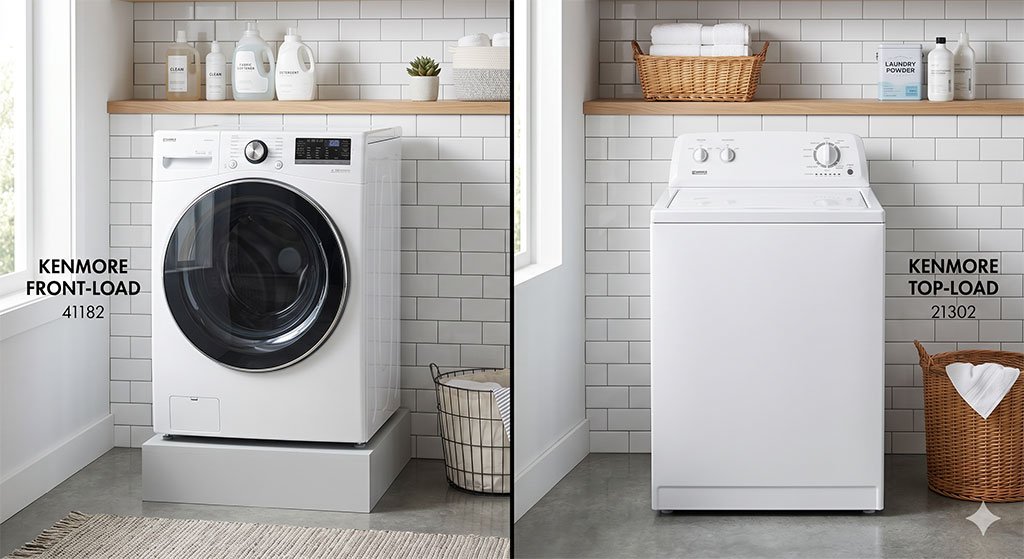
Top-Load vs. Front-Load Models: Kenmore Washer Reset Differences
Kenmore manufactures both top-loading and front-loading machines. The reset procedures are entirely different between the two styles, so you must know what you are working with.
The dial sequence we discussed works primarily for top-loading models. Front-load washers rely much more on button combinations because they use entirely different computerized control boards.
To reset a Kenmore front-load washer, try this simple button sequence:
- Press the Pause/Cancel button twice in a row.
- Press the Power button once to shut down the interface.
- Unplug the machine for a few minutes if the error persists.
Always check your specific owner’s manual if these generic sequences do not work. Manufacturers change control board layouts and reset protocols frequently to update security and safety measures.
What to Do If the Factory Reset Fails?
If you tried the power cycle and ran the diagnostic sequence but your washer is still broken, you are likely dealing with a physical hardware failure. The control software is fine, but a mechanical part has given out.
Here is a quick DIY troubleshooting checklist to locate the broken component:
- Test the Lid Lock Switch: The machine will completely refuse to spin or agitate if the lid does not lock securely. This is a built-in safety precaution.
- Value-Add Fix: Check the latch for lint or detergent buildup and clean it thoroughly with a damp cloth.
- Clear the Drain Pump: Small, everyday items like loose coins, hairpins, or baby socks frequently clog the pump filter.
- Value-Add Fix: If water is refusing to drain from the tub, accessing and clearing out this pump filter should be your very first step.
- Listen to the Motor: If you hear a loud humming but see no movement, the drive motor or shift actuator might be failing.
If you are comfortable with basic DIY appliance repairs, lid switches and drain pumps are cheap to order online. However, if the issue points to the internal motor, it is usually time to call a professional technician.
Preventative Maintenance Tips for Longevity
Resetting your washer is great for immediate emergencies. However, performing routine preventative maintenance keeps those glitches from happening in the first place, significantly extending the appliance’s lifespan.
Follow these three essential maintenance habits:
- Let the Drum Breathe: Always leave the washer lid or door slightly open after finishing your laundry. This crucial step allows trapped moisture to escape, preventing gross mold and mildew from growing around the rubber seals.
- Clean the Water Inlet Filters: Hard water deposits easily clog the tiny mesh screens where your water hoses connect to the back of the machine. Cleaning these screens every six months prevents frustrating slow-fill error codes.
- Level the Machine Properly: Gently push down on all four corners of your washing machine. If it rocks back and forth, it is out of balance.
An unbalanced washer forces the internal suspension rods to work too hard. This leads to violent shaking during the spin cycle and eventual motor burnout. Use a spirit level and adjust the bottom feet until the machine sits perfectly flat.
FAQ
No, most modern Kenmore washers do not have a dedicated reset button. You have to use a combination of button presses or dial turns to access the hidden reset features.
A hard reset takes about five minutes of unplugged time. The diagnostic recalibration cycle takes roughly two to three minutes to physically test all the components inside the cabinet.
When all lights flash simultaneously, the washer is either indicating a severe fault, or it has successfully entered diagnostic mode. If you didn’t trigger diagnostic mode on purpose, unplug the machine immediately.
Bottom Line
Dealing with appliance breakdowns is never fun and always seems to happen on the busiest days. However, knowing exactly how to reset kenmore washing machine can save you a tremendous amount of time, stress, and money.
Remember, always start with the simple hard reset by unplugging the unit from the wall. If that fails, carefully move on to the diagnostic dial sequence we covered above. These two simple steps resolve the vast majority of electronic hiccups.
By taking just a few minutes to troubleshoot the software yourself, you can often restore your machine to perfect working order without ever picking up the phone to call an expensive repairman.




Leave a Reply